Designing Headless Commerce Starts with Data — Not Apps
Prioritizing API architecture and data quality for seamless frontend experiences
It doesn’t matter if I speak to E-commerce gurus or leaders in App development, they all say the same: the difficulty is not making the Apps or customer journeys. The difficulty is in getting the right data, in the right quality.
This is even more urgent in Headless setups. Headless Apps do not have any data or local business logic. They live by data and services from backend systems like Dynamics 365 ERP and Dynamics 365 CE (CRM).
In this blog post, we’ll see how we can overcome these hurdles.
Hurdle 1 – Exposing the right data right
In the ideal world,UX designersare in the lead when Apps, portals or any customer oriented systems are built. Side note here is that I recommend to converge customer and employee oriented apps, but let’s put that aside. In how many Dynamics 365 implementation projects are UX designers in the lead when it comes to customer oriented scenarios? I didn’t come across many in my 20-year career.
Let’s revert the question. How can we put UX designers in the lead?
My answer:
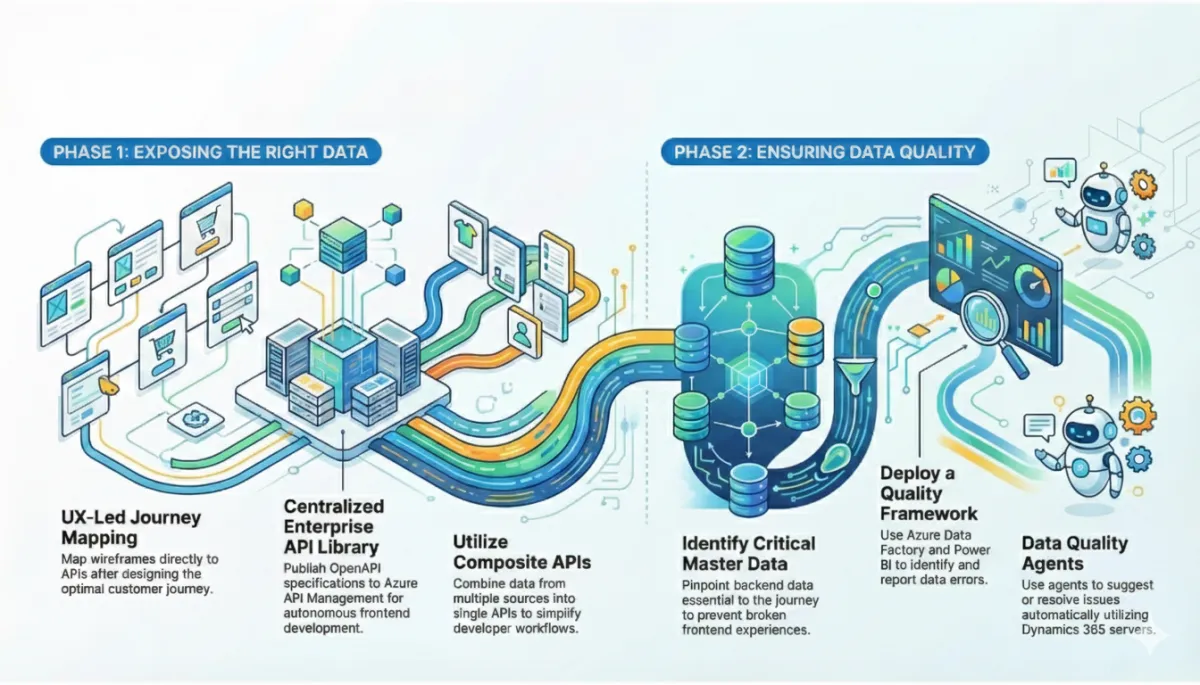
1-Start with the journey. let the UX designers design the optimal customer journey first and then map to Data and Services. Not the other way around. Literally map a wireframe to APIs. Please note that this requires your API providers to be very experienced in both the backend system(like D365 ERP)and API domain.

2-Enterprise API library. Publish core/key APIs in an enterprise API library. Ideally even before wireframe design begins. My best practice as I already described in my blog post in 2022: describe your D365 APIs in the openapi standard and publish them on Azure API Management

3-Publish the openapi specifications. Use APIM Developer portal or Swagger portal to deliver the API specs to your App/portal developers. See some examples below which combine APIs based on D365 Commerce and D365 ERP:
4-Composite APIs. In many cases, UX designers design grids with data which is exposed by multiple APIs. For example, Sales order line information combined with product data. My best practice: combine them in a composite API to make life easier for the developers. The “individual” APIs and “composites” can co-exist in your API library!
With the wireframe mappings and documented APIs in the bag, frontend developers can now automatically generate code to consume the APIs. This will allow them to autonomously support your UX designers!
Hurdle 2 – Exposing data in the right quality
If your PDM/PIM data is not having the right product descriptions, categorizations or translations, it can negatively impact your customer experience. No matter how strong your UX/customer journey is designed and implemented. In headless Apps, frontend journeys may even get broken returning no data at all!
So, the key question is: how can we guarantee data quality? My best practices:
1-Identify your critical data. Identify backend setup and master data which is critical for your customer journeys. You can easily derive them from your wireframe/API mappings. Map this back to your data and processed in D365 ERP and CRM or other backend Apps.

2-Prevent errors by a strong process foundation. Educate the responsible business owners properly. Make them understand what the impact of their actions is on data quality.

3-Deploy a Data Quality framework. Utilize Synapse link or Fabric link to export your data to Azure Data Lake. Use Azure Data Factory to process the data and identify errors and warnings. Write these errors and warnings into tables. Surface the errors and warnings in Power BI Reports. This is your feedback loop into #2, the BAU processes in your organization.

4-Deploy a Data Quality agent. Let Data Quality agents work with the errors and warnings to assist your users to resolve the error. Agents could suggest data actions, such as unpublishing items from assortments is they miss critical data or prices. As a next step, Agents could even resolve the actual issues utilizing Dynamics 365 MCP server.
How 365CONNECT Secures Your Headless Success
As we've explored, the biggest threat to your headless commerce project isn't a lack of features - it’s the quality of the data feeding them. A beautiful customer journey falls apart the moment a headless app retrieves broken or missing data from the backend.
While many partners focus on the "sexy" frontend features, 365CONNECT specializes in the essential upstream work that ensures those features actually function. We bridge the difficult gap between deep D365 ERP logic and modern API domains, ensuring your design and data work in harmony rather than conflict.
Don't build from scratch - start with control. Implementing the feedback loops and error detection we described can be complex, but you don’t have to do it alone. We ship a quick-start Data Quality framework designed to give your organization a grip on data quality from Day 1.
By leveraging our pre-built architecture - utilizing Synapse, Azure Data Factory, and Power BI. We help you:
• Identify critical data gaps before they break your customer experience.
• Automate error detection to keep your backend data clean and reliable.
• Empower business owners with visible feedback loops, preventing issues from reaching your customers.
Ready to build a headless architecture that lasts? Stop worrying about broken APIs and start focusing on your customer. Contact the team at 365CONNECT today to implement our Data Quality framework and build a solid foundation for your digital future.


