We don't just build it.
We keep it running
after you go live.
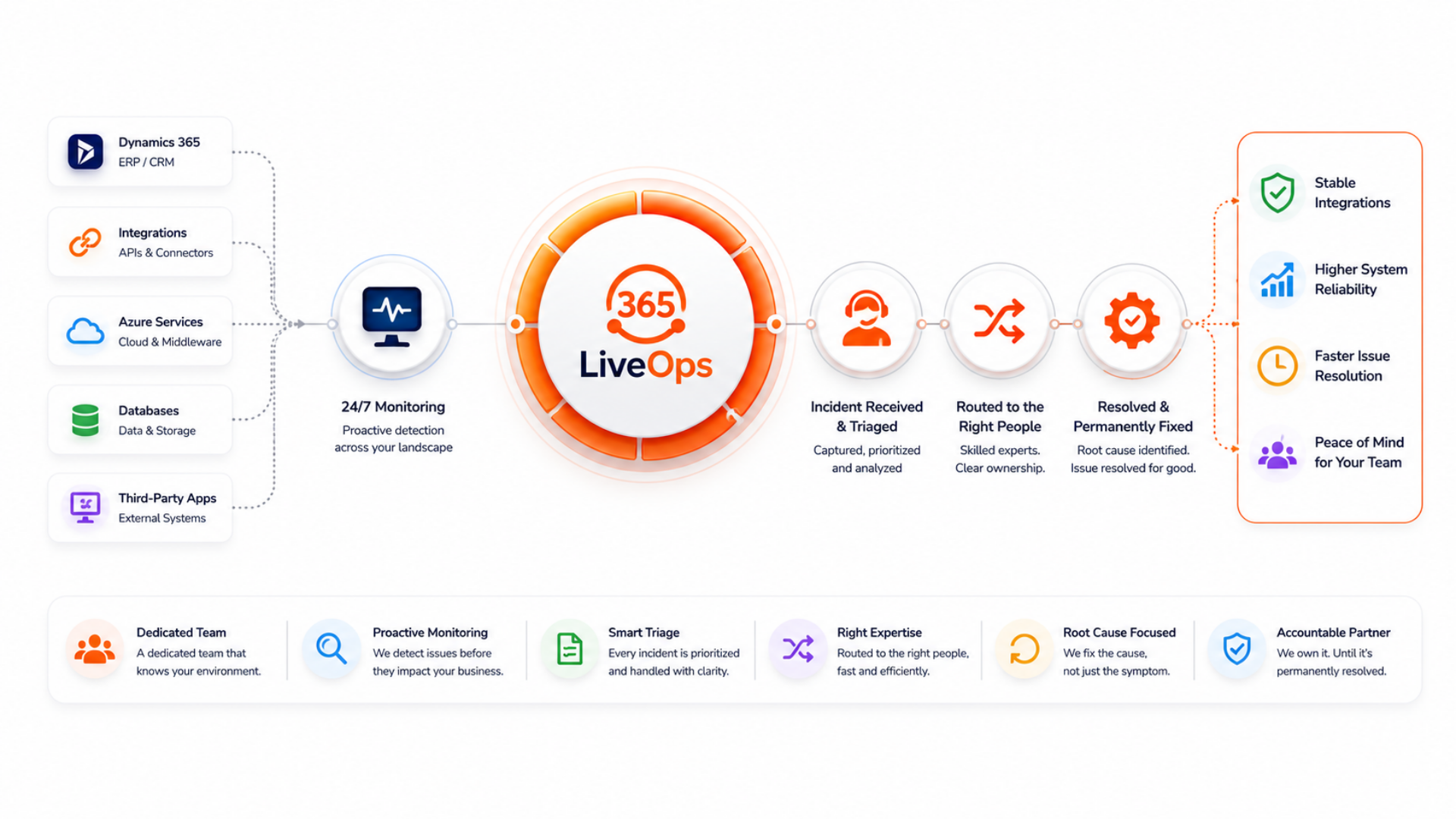
365 LiveOps is our application managed service - a dedicated team that monitors your Dynamics 365 integration landscape, receives and triages every incident, routes it to the right people, and ensures recurring problems are permanently resolved. Not a helpdesk. A partner who owns it.
Go live.
Then what?
- Most implementation partners hand over the keys at go-live and move on. Your team inherits a complex integration landscape - without the specialist knowledge to diagnose failures, triage incidents, or fix root causes.
- When an integration fails in production, nobody owns it. The ERP partner points to the commerce agency. The commerce agency points to the middleware team. Meanwhile your customers are waiting and your team is sending emails.
- The same incidents keep recurring - because fixes are reactive, not structural. Nobody has time to analyse patterns, find root causes, or engineer permanent solutions while the support queue keeps growing.
The cost is real: unresolved recurring incidents erode customer trust, drain internal resource, and create hidden technical debt that compounds with every release. Managed support isn't a cost - it's protection for your go-live investment.
EIF detects the incident.
LiveOps owns what happens next.
365 LiveOps is the human and operational layer that sits on top of the Error-to-Incident Framework. When EIF raises an incident, our LiveOps team receives it, reviews it, routes it to the right specialist, tracks it to resolution - and makes sure it never comes back.
- Detects integration failures
- Enriches with business context
- Classifies severity
- Raises tracked incident
- Reviews & triages incident
- Routes to right specialist
- Tracks to resolution
- Eliminates root cause
- Customers unaffected
- Full audit trail
- Monthly health report
- Fewer incidents over time
Four stages.
One end-to-end service.
From the moment an error occurs in your landscape to the moment it's permanently resolved - LiveOps handles every step, with full visibility for your team throughout.
Detect & Receive
Azure Application Insights and the EIF framework monitor your integration landscape continuously - APIs, ERP batch jobs, commerce flows, and data feeds. When something fails, a structured incident lands in our LiveOps team's queue instantly, enriched with context, severity, and recommended actions. Nothing slips through undetected.
Triage & Route
Our team reviews every incident, validates severity, and routes it to the right specialist - whether that's a D365 functional consultant, an integration engineer, or a commerce developer. Incidents are tracked in your chosen tooling (Microsoft Teams, DevOps Boards, or your ITSM platform) with full visibility for your internal team at every step.
Resolve & Close
The right engineer applies the fix, validates the resolution, and closes the incident with a full audit trail. SLA compliance is tracked per incident. Your team is kept informed throughout - no chasing, no status emails, no ambiguity about who owns it or where it stands.
Problem Management
Every month, our team reviews all incidents from the preceding period - identifying patterns, recurring failures, and systemic weaknesses. Root causes are investigated and permanent fixes are engineered and deployed. The goal is not just to resolve incidents faster - it's to have fewer incidents each month than the last.
One managed service.
Every stakeholder protected.
LiveOps removes the post-go-live risk for every team that depends on your integration landscape staying healthy.
IT & Operations
No more owning incidents you didn't build. LiveOps takes full accountability - with a named team, tracked SLAs, and a monthly report showing exactly what happened and what was done about it.
Commerce & Sales
Integration failures are caught and resolved before they affect orders, pricing, or customer experience. Your eshop and ERP stay in sync - your customers never know there was a problem.
Service & Support Managers
Full incident visibility, SLA dashboards, and a monthly problem management review - giving you the data to report upward and the confidence to know the landscape is under control.
Leadership & Programme Sponsors
Your go-live investment is protected. A specialist team is accountable for the integration landscape - not spread across multiple vendors, not dependent on tribal knowledge, and not reactive to customer complaints.
Everything your landscape needs.
Nothing you don't.
365 LiveOps is structured around what actually keeps a Dynamics 365 integration landscape stable - monitoring, incident management, problem elimination, and regular governance.
Proactive Monitoring
- Azure Application Insights across all integration layers
- Failed request tracking - operations, dependencies, exceptions
- Real-time alerting on P1 and P2 severity events
- API health checks and keep-warm monitoring
- ERP batch job and data feed failure detection
Incident Management
- Structured incident receipt from EIF framework
- Severity triage and specialist routing
- SLA-governed response and resolution tracking
- Full audit trail per incident
- Teams or ITSM integration for your team's visibility
Problem Management
- Monthly review of all incidents from the prior period
- Pattern identification across recurring failures
- Root cause analysis per recurring problem
- Permanent fix design and deployment
- Trend reporting - incidents should decrease month on month
Governance & Reporting
- Monthly service review with named 365Connect contact
- Incident volume, SLA compliance, and resolution time report
- Landscape health summary across all monitored systems
- Roadmap input - proactive recommendations to reduce risk
- Flexible SLA models tailored to your business requirements
Every incident classified.
Every response governed.
We work with you to define SLA targets that match your business requirements. Our incident severity model provides a consistent framework - response times and resolution targets are agreed per client and built into the service contract.
Full system outage or complete loss of a business-critical integration. Orders cannot be placed, ERP sync is broken, or eshop is inaccessible. Immediate escalation. Named engineer assigned within agreed SLA.
- Eshop API gateway down
- Order flow to D365 broken
- Authentication failure across all users
Significant degradation affecting a subset of users, a specific integration flow, or a non-critical business function. System is operational but impacted. Workaround may exist. Prompt response within agreed SLA window.
- Pricing sync delayed for one organisation
- Cart search returning errors intermittently
- Specific API endpoint returning 500s
Low-impact issues, cosmetic errors, or improvements that do not affect core business operations. Logged, tracked, and addressed within the agreed service window. Often picked up during the monthly problem management review cycle.
- Translation missing for one product attribute
- Minor UI rendering issue on product detail
- Non-critical data warning in validation report
SLA response and resolution targets are defined per client and agreed as part of the service contract. We offer flexible SLA models - from standard business hours coverage to extended and 24/7 arrangements - based on your operational requirements.
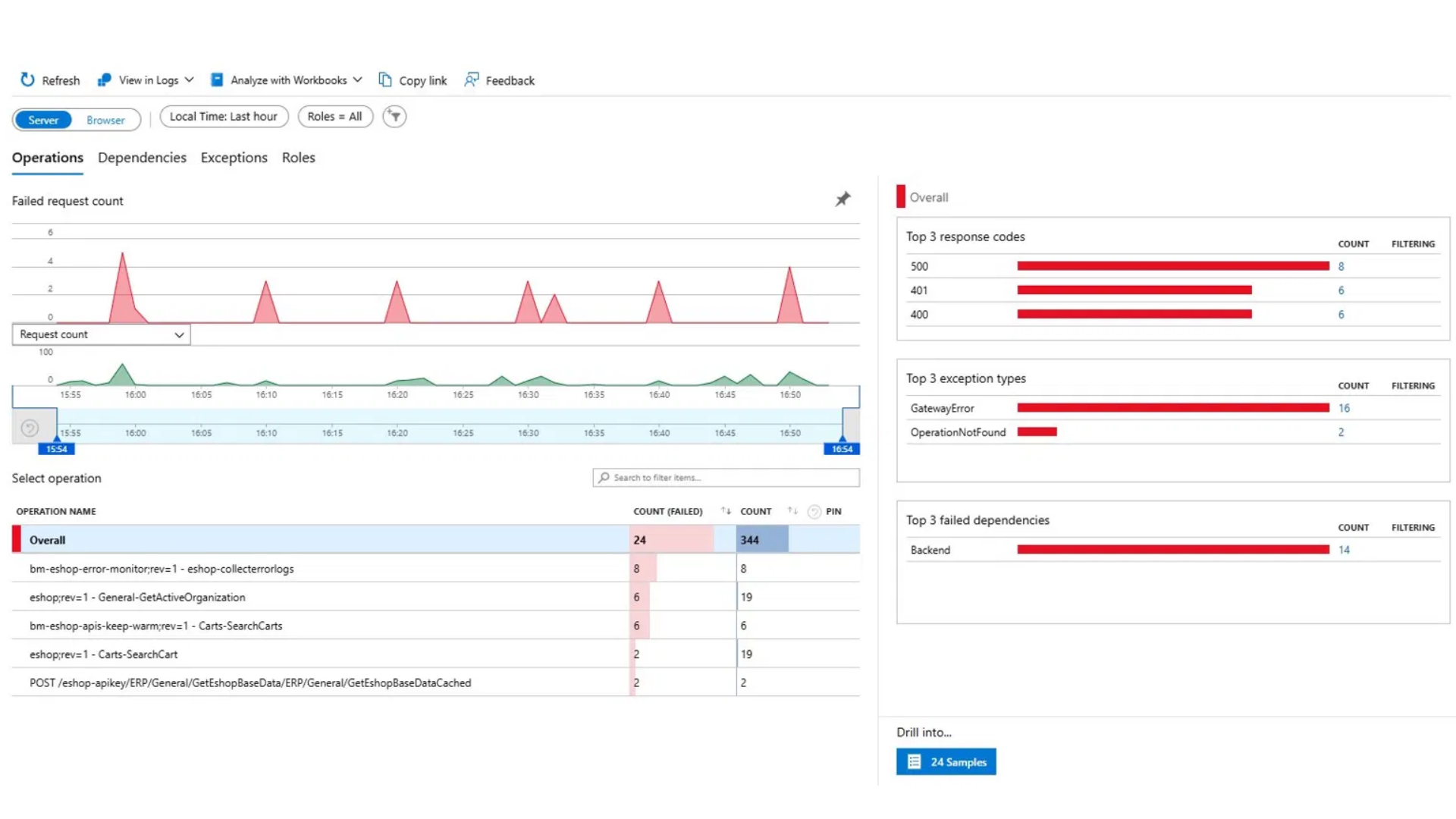
This is what our team sees
monitoring your landscape.
Azure Application Insights gives our LiveOps team real-time visibility across every operation, dependency, and exception in your integration layer - so we see failures before your customers do.
See LiveOps in
action.
Watch how an integration failure is detected, triaged, routed, and resolved - end to end - with full visibility at every step.
Video coming soon
Beyond support tickets.
A partner who owns the outcome.
Always-On Protection
Your integration landscape is monitored continuously. Failures surface to our team - not to your customers. Issues are caught, owned, and resolved before they cause commercial damage.
Faster Resolution
Every incident is triaged by a specialist who understands your D365 landscape - not a generic helpdesk. The right engineer is on it faster, with full context already in hand.
Fewer Incidents Over Time
Problem management isn't just about fixing what breaks - it's about engineering out the root causes. Each monthly review cycle should leave you with fewer recurring incidents than the month before.
A Named Team, Not a Queue
You have a named 365Connect contact who knows your landscape, attends your monthly reviews, and is accountable for the health of your integrations - not a rotating helpdesk starting from scratch every time.
Go live with confidence.
Stay live with 365 LiveOps.
If you're approaching go-live or already running a Dynamics 365 integration landscape without specialist managed support - let's talk about what LiveOps can do for you.